Your AI receptionist
Clarifies which service a caller wants, honors a barber preference, reads back the time and asks for confirmation before booking.
- Service clarification
- Barber preference
- Time readback
- Booking confirmation
AI booking for barbershops
LineUP helps your customers find the right service, the right barber and the right time, through a voice agent, a guided chat assistant and a booking widget branded to your shop.
MVP preview. Guided merchant onboarding.
 Demo data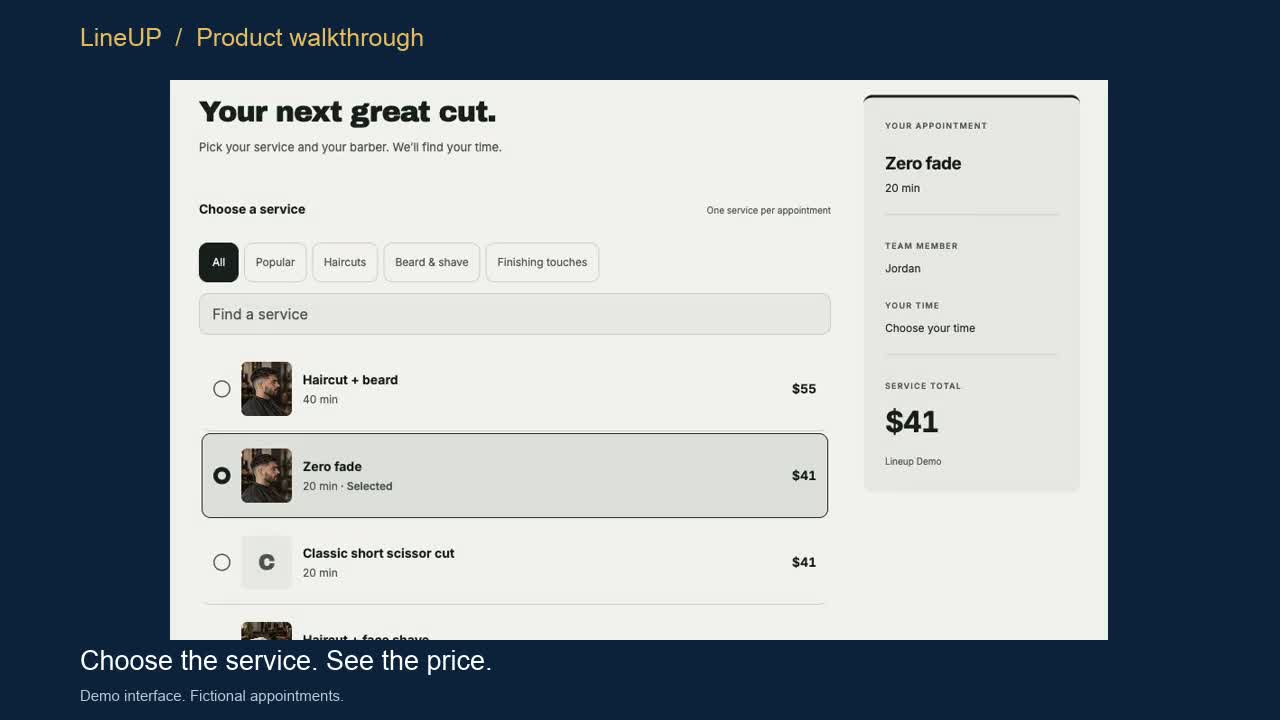
What LineUP does
Clarifies which service a caller wants, honors a barber preference, reads back the time and asks for confirmation before booking.
A branded booking widget with your service and staff photos and a clean mobile flow from service to confirmation.
Square is the initial integration focus, with a simple owner workspace for services, team and hours.
Live channels are enabled during guided onboarding. Selected channels are turned on per shop once setup and testing are complete.
Demos
Product walkthroughs. Demo data.
Walkthrough 1 · 20 seconds · Silent, with captions
An edited screen walkthrough of the LineUP booking widget built from real demo-interface captures with fictional data. It is not a live merchant transaction.
Walkthrough 2 · 15 seconds · Silent, with captions
A walkthrough of the guided shop-information assistant, which offers set choices for services, barbers and times and leads the customer to the next step. It is not a recording of the phone agent.
Want to see it with your own services and team?
Book a LineUP demoIllustrative example
A written example of how the voice agent handles a call. It is not a recording. The agent confirms the service, barber, time and price before it books.
In a sandbox test, the voice agent clarified a beard trim with Alex and created the matching booking in a Square test account.
Caller
Hi, I'd like to book with Alex.
LineUP
Happy to help. Which service would you like with Alex?
Caller
A beard trim.
LineUP
Alex has Saturday at 10:00 AM open. That's a beard trim with Alex, Saturday at 10:00 AM, starting at $20. Shall I book it?
Caller
Yes, please.
LineUP
You're booked with Alex for Saturday at 10:00 AM.
Guided setup
Services, prices, barbers, hours and the questions customers ask most.
We connect Square and set up your team and services with you.
You try the flows yourself, then we activate the channels you choose.
Book a demo through our scheduling page. Setup is guided from first call to activation.